To the Chairpersons
To Chairpersons who will be attending on-site
- 1. Please come to the Chairperson/Speaker registration desk on the 5th floor at least 20 min prior to the start of your session.
- 2. Please be seated at the next Chairperson’s seat 10 min prior to the start of your session.
- 3. Q&A sessions will be held at the on-site venue using the Q&A microphone at the venue, and for Zoom participants, using the Q&A function. Please use the Chairperson’s PC at the venue to respond to questions.
- 4. Please cooperate so that all sessions, including lectures and Q&A, will be completed within the time allotted.
To the Presenters
In Regards to COI
Please disclose COI (Conflict of Interest) at your best knowledge. When you are corporate employees, please display COI tags to prevent from COI from other corporations. Presenters for Oral Presentation are required to show COI on the second slide (next to titles). Presenters for Poster Presentation are required to show COI on the last position.
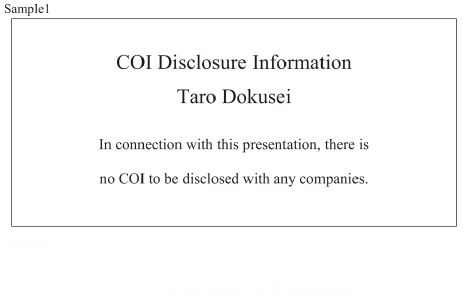
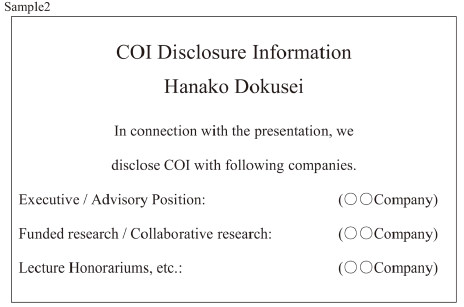
Please disclose COI (Conflict of Interest) at your best knowledge. When you are corporate employees, please display COI tags to prevent from COI from other corporations. Presenters for Oral Presentation are required to show COI on the second slide (next to titles). Presenters for Poster Presentation are required to show COI on the last position.
To Presenters of lectures who will be speaking on site
-
1. Data and PCs
Please bring your USB memory sticks in 30 min. advance at the latest to the PC center (5th floor of the Tower Hall). For PC users, please reconfirm your presentation data at the PC center, and bring your PC to the PC operator ahead on the left side of the venue at least 15 min. before your session. - 2. Available PC equipments for presenters are PC projectors ONLY.
- 3. When the prior presenter starts his/her presentation, please sit in the next-presenter seat.
- 4. Slide size of 16:9 is recommended.
[Windows]
- 1) Please bring your USB memory stick or your own PC. (It is recommended to bring personal USB memory sticks or PCs to avoid any troubles that may be caused by differences in the user environment.)
- 2) Windows 10 based PCs with Microsoft Power Point 2016, 2019 and 2021 are available.
- 3) Please do not store any other data other than your presentation in your USB memory stick.
- 4) An irrelevant data will be deleted completely by the congress secretariat.
[Macintosh]
- 1) Please bring your own PCs.
- 2) No USB memory sticks are allowed.
[Please note the followings in regards to Windows PCs and Macintosh PCs.]
- 1) Monitor output with a HDMI is required.
- 2) Please make sure to bring the power cable.
- 3) Please bring an extra copy of your data in case of any unexpected media problems.
- 4) Please bring your PC with you when you finish your presentation.
To Chairpersons and Presenters who will be speaking remotely
-
1. The URL to participate in the Zoom webinar will be sent from “Zoom <no-reply@zoom.us>” on or about Jan 19 (Thu) as a manual showing how to participate and answer questions, so please be sure to confirm that you have received this e-mail with the following title.
“URL information for participation in the 39th Annual Meeting of the Japanese Society of Toxicologic Pathology and the Annual Scientific Meeting_Zoom on Jan 25 (Wed).”
“URL information for participation in the 39th Annual Meeting of the Japanese Society of Toxicologic Pathology and the Annual Scientific Meeting_Zoom on Jan 26 (Thu).”
If you have not received the e-mail by 12:00 on Jan 20 (Fri), please contact the registration desk (jstp39@cfmeeting.com). - 2. Questions and answers will be posted by participants using the microphone at the venue and chat on Zoom. Chairpersons should adopt the question.
-
3. On January 17 (Tue) at 4:00 p.m., the Chairpersons and Presenters of the lectures will be briefed on how to proceed on the day based on the manual. We will have a rehearsal of the presentations and Q&A session with screen sharing.
We will send an invitation e-mail for the “Chairperson Presenter Briefing and Rehearsal” on January 11 (Wed), and we look forward to your participation. The invitation e-mail will also include the manuals for Chairpersons and Presenters. - 4. Please prepare a PC with a camera and microphone connected for use with Zoom.
- 5. As mentioned in the manual, please update your Zoom application to the latest version.
- 6. Depending on your Internet connection and equipment conditions, remote communication may become unstable, which may cause problems with the video images, etc. Please pay attention to the connection conditions.
To Poster Presenters (General Abstracts)
-
1. Posters for general abstracts will be displayed on-site and webcast on demand using LINC Biz.
Questions and answers will be accepted via the LINC Biz message (chat) and delivered on-demand via LINC Biz.
The following schedule will be used to register and publish poster presentation data, and to register questions and answers.
Jan 6 (Fri) - 13 (Fri): Poster presentation data submission
Jan 25 (Wed): Poster presentation data will be made public, and registration for questions and answers will begin.
Jan 25 (Wed) - 26 (Thu): Posters on site
Jan 30 (Mon): End of questions
Feb 3 (Fri): End of answers
Feb 6 (Mon): End of webcast
-
2. Preparation of Poster Presentation Data
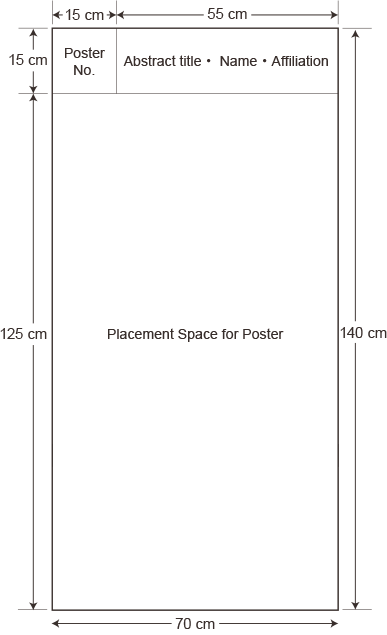
- (1) Poster size should be 140 cm (H) x 70 cm (W).
- (2) Presentation numbers should be placed in the upper left corner of the poster (15 x 15 cm), and the title of the presentation, presenter’s name, and affiliation should be written to the right of the presentation number.
- (3) Posters must be prepared in English. If you have submitted abstract in both Japanese and English versions, please write both Japanese and English names in the “Abstract title, Presenter’ s Name, and Affiliation” section. The “Contents of Presentation” should be written in English for all of the text, tables and figures.
-
(4) Presentation data for LINC Biz registration should be saved in jpg format.
*JPG images should be within 6048 x 4032 pixel resolution and 100 MB in size. Please be careful when using Adobe software such as Illustrator.
*A poster-sized PowerPoint template of 140 cm (H) x 70 cm (W) is available. If you need it, please download and use it.
https://cfmeeting.com/jstp39/file/template_140_70.pptx
When saving a PowerPoint file, select“ JPG File Exchange Format” under“ File Type”.
- 3. The URL for submitting your presentation data will be sent via e-mail titled “Submission of Presentation Data for the 39th Annual Meeting of the Japanese Society of Toxicologic Pathology” around 10:00 on Jan 6 (Fri), 2023.
- 4. “Account Registration” is required to participate in LINC Biz. A manual on operating the system and asking questions will be posted on the website by Jan 24 (Tue), so please check back.
-
5. On-site poster posting and removal times are as follows
Posting time: Jan 25 (Wed) 9:00-9:30
Removal time: Jan 26 (Thu) 15:00-15:50
*If you cannot visit the site, the secretariat can print and display posters for you, for a fee, using the poster print data provided in advance. Please contact the Secretariat (jstp39@cfmeeting.com) by Jan 13 (Fri) if you wish to do so. - 6. From Jan 25 (Wed) to Jan 30 (Mon), questions and messages will be posted by participants, so please respond as promptly as possible. The final deadline for registration of responses will be Feb 3 (Fri).
- 7. The webcast will be closed on Feb 6 (Mon). Submitted poster presentation data, questions, and answers will be deleted.